
VR Lab – Facility Information
If you would like to use the following facilities, Please submit the form.
AI Application

Whisper Transcription (Mac OS version)
VR Lab – Lifetime Subscription
Quickly and easily transcribe audio files into text with state-of-the-art transcription technology Whisper. Whether you’re recording a meeting, lecture, or other important audio, Whisper for Mac quickly and accurately transcribes your audio files into text.
Features
- Easily record and transcribe audio files
- Just drag and drop audio files to get a transcription
- All transcription is done on your device, no data leaves your machine
- .srt & .vtt subtitles export
- Get accurate text transcriptions in seconds (~15x realtime)
- Supports Metal and GPU processing for ultra fast performance
- Transcribe podcasts by adding audio files for each speaker. The transcript will be generated and split up per speaker..
- Search the entire transcript and highlight words
- Audio playback and syncing to transcripts
- Supports multiple languages (fastest model is English only)
- Copy the entire transcript or individual sections
- Reader Mode
- Edit and delete segments from the transcript
- Select transcription language (or use auto detect)
- Supported formats: mp3, wav, m4a, mp4, mov, ogg and opus
- Supports Tiny (English only), Small, Base, Medium, Large-V2, Large-V3 models
- Batch transcribe multiple files and export to multiple formats at the same time (srt, vtt etc)
- Export to Word, PDF or HTML websites
- Transcribe system audio (such as Zoom meetings and any other audio)

VR Lab – Annual Subscription *From 2025
The Describe tool helps you generate creative prompts by analyzing an image you upload and then offering words and phrases that describe the image. It’s a great way to discover new style words and get inspiration for your text prompts.
Features
- Text-to-Image Synthesis: Users generate initial images by providing simple or detailed text descriptions (prompts).
- Image Prompts & References: The AI can use reference images to influence the content, style, composition, and colors of new creations. This includes specific features like Character References, Style References, and Omni References.
- Advanced Prompting Controls (Parameters): Users can fine-tune image generation using various parameters (starting with –), such as setting aspect ratios (–ar), controlling chaos/variety (–chaos), excluding unwanted elements (–no), and adjusting style strength (–stylize).
- Image Editing Tools: On the web interface, users can access an editor to make precise modifications to generated images.
- Variations and Remix Mode: Users can generate multiple variations of a favorite image or use Remix Mode to alter the prompt and parameters of a generated image to guide its evolution.
- Video Generation: The platform includes features to turn static images into short, looping videos, with controls for motion intensity and resolution.
- Customization and Personalization: Midjourney learns user aesthetic preferences through image ranking and allows users to create and save custom styles with the Style Tuner feature.
- Web Gallery & Community: The generated images are stored on the Midjourney website, where users can organize their work, browse creations by others for inspiration, and participate in community features.
- Multiple Modes: Users can switch between different generation modes.
Motion Capture Applications

VR Lab – 3 Years Subscription*From 2025
Tutorials videos
Behind every great animation is a performance worth capturing. The new Xsens Link, paired with its redesigned form-fitting eSuit, translates real movement into digital characters with greater accuracy, stability, and fidelity, bringing stories to life with unmatched realism.
Features
- 🎯 Accuracy & Performance
- High‑precision inertial motion capture using IMU (Inertial Measurement Units) sensors.
- Captures 6‑DoF (Degrees of Freedom) motion per joint.
- Provides low‑latency, real‑time data streaming suitable for live applications.
- ⚙️ System Options
- Available in multiple setups: Xsens MVN Awinda (wireless) and Xsens MVN Link (tethered, high‑end).
- Can be adapted for indoor or outdoor use without optical markers.
- 💻 Software Integration
- Works with MVN Animate or MVN Analyze software for recording and refining motion data.
- Real‑time streaming compatibility with major 3D tools: Unreal Engine, Unity, MotionBuilder, Maya, and Blender.
- 📶 Wireless Connectivity
- Wireless sensors with robust signal stability.
- Battery‑powered for field or studio sessions (up to ~6 hours continuous use).
- 🧍♂️ Ease of Use
- Fast suit‑up time (≈5 minutes).
- Body‑fitting Lycra suit with integrated sensors ensures comfort and repeatable calibration.
- Portable — no need for specialized studio setup or cameras.
- 🧩 Calibration & Reliability
- Quick magnetically immune calibration; minimizes tracking drift using Xsens’ proprietary algorithms.
- Suited for dynamic or fast‑paced performances.
- 🎥 Data & Output Formats
- Exports to standard motion formats (FBX, BVH, C3D).
- Supports real‑time 3D visualization and live retargeting to characters.
- 🧠 Analytics & Research Support
- Offers tools for biomechanical analysis, gait studies, and human‑motion research.
- Integrates with force plates and EMG sensors for advanced motion data correlation.
- 🔗 Integration with VR/AR
- Compatible with VR systems, avatars, and virtual production workflows.
- Enables real‑time full‑body tracking for immersive environments.
Xsens Integration with Unity
1️⃣ Required Components
- Xsens MVN Animate Pro (data streaming enabled)
- Unity 2021 LTS or later
- Xsens MVN Live Plug‑in for Unity (available from Xsens developer portal)
- Supported full‑body Xsens motion‑capture suit (Link or Awinda)
2️⃣ Setup Steps
| Step | Description |
|---|---|
| 1. Prepare MVN Animate | Open MVN Animate → connect your suit → perform calibration (T‑pose or N‑pose) → confirm smooth real‑time motion. |
| 2. Enable Live Stream | In MVN Animate: “Live Stream → Enable Network Stream (UDP)”. Default port: 9763. |
| 3. Install Unity Plugin | In Unity: Assets → Import Package → Custom Package → Xsens Live Link. Import all sample assets. |
| 4. Add Xsens Avatar | In the Unity scene, drag the Xsens Animator Prefab into Hierarchy. Assign the humanoid avatar rig. |
| 5. Configure Connection | In Xsens Connection Component, enter the IP address of the MVN computer. (Use 127.0.0.1 if local.) |
| 6. Test Live Feed | Press Play → Unity begins receiving real‑time body data from MVN. The character mimics the performer. |
| 7. (Optional) Combine with Manus Gloves | Enable “Xsens → Manus Bridge” in MVN; the gloves drive hand motion while Xsens drives the body. |
| 8. Record / Retarget | Use animation recording in Unity’s Timeline or export from MVN as FBX / BVH for reuse. |
3️⃣ Advanced Educational Uses
Demonstrating avatar control in XR for interactive simulations.
Real‑time visualization of biomechanical data or motion graphs.
Creating physics or kinematic studies using sensor streams.
Xsens Integration with Unreal Engine
1️⃣ Required Components
- Xsens MVN Animate Pro (Live Plug‑in)
- Unreal Engine 5.x
- Xsens MVN Live Link Plugin for Unreal (available via Xsens or Unreal Marketplace)
2️⃣ Setup Steps
| Step | Description |
|---|---|
| 1. Connect Hardware | Wear and calibrate the Xsens suit in MVN Animate. Ensure smooth tracking in MVN first. |
| 2. Enable Live Stream | In MVN Animate: Live Stream → Enable Network Stream (UDP Port 9763). |
| 3. Install Plug‑in in Unreal | Place the Xsens MVN Live Link folder in the Plugins directory or enable it from Plugins → Live Link → Xsens MVN Live Link. Restart Unreal. |
| 4. Configure Live Link Source | Open Window → Live Link, click + Source → Xsens MVN Source. Enter IP address of MVN system. |
| 5. Add Character Blueprint | Create or import a Skeletal Mesh with a compatible rig (e.g., UE Mannequin). Add a Live Link Component to your actor. |
| 6. Assign Subject Name | In Details → Subject Name, select the stream from MVN Animate. The animation updates in real time. |
| 7. Record & Visualize | Record motion through Unreal’s Sequencer or Take Recorder for later editing. |
| 8. Combine with Faceware / Manus (Optional) | Add Faceware Live Client and Manus Core Integration for full‑body + face + hand tracking. |
3️⃣ Advanced Lab Applications
Visualization of kinematic motion parameters (joint angles, velocity, torque).
Live virtual performance in VR / AR with synchronized hand & face capture.
MoCap‑to‑avatar pipeline demos for animation or game design classes.
VR Lab – 3 Years Subscription*From 2025
Tutorials videos
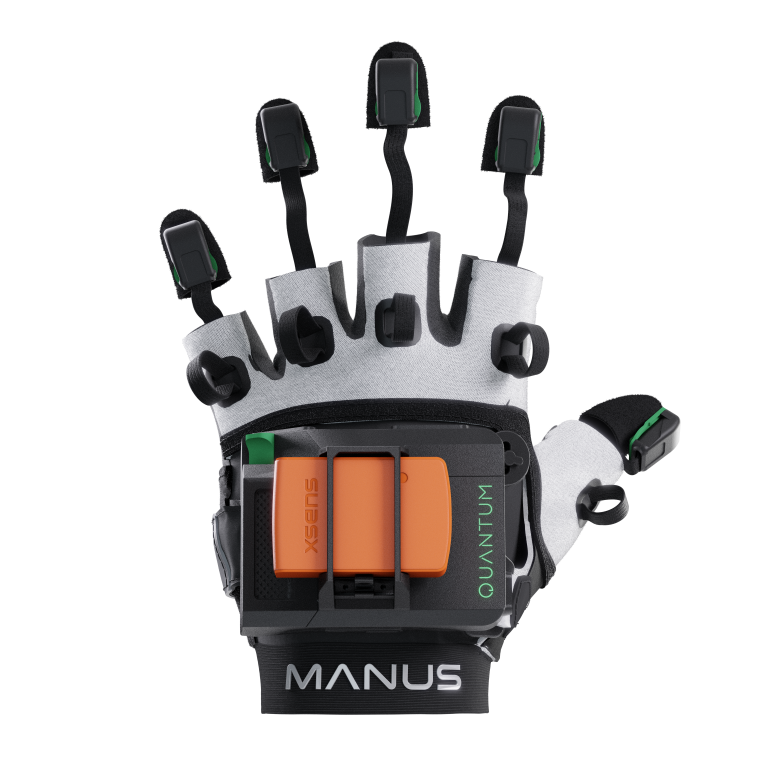
A professional‑grade hand and finger motion capture system commonly used in VR, animation, simulation, and research environments. There are no more limitations to your finger capture. Save valuable time while animating, without losing the lifelike feeling of your movements.
Features
- 🎯 Motion Capture Precision
- Tracks individual finger joints and full‑hand articulation using inertial sensors (IMUs) and flexible sensors.
- Provides high‑accuracy and low‑latency hand motion data in real time.
- ⚙️ Product Line Options
- Available models: Manus Prime II, Quantum Metagloves, and OptiTrack Integration models.
- Each designed for varying accuracy, research, or animation needs.
- 💻 Software Integration
- Works with the Manus Core software suite for calibration, visualization, and data streaming.
- Integrates seamlessly with Unity, Unreal Engine, MotionBuilder, and Blender for real‑time animation.
- 📡 Connectivity & Compatibility
- Wireless Bluetooth and USB connectivity.
- Supports compatibility with VR systems (HTC Vive, Varjo, etc.) and Xsens body suits for full‑body capture.
- 🖐️ Haptic & Feedback Options
- Optional haptic feedback modules provide tactile response or vibration cues.
- Useful in training simulations and immersive VR experiences.
- 🧩 Calibration & Setup
- Quick calibration process (under 3 minutes).
- Calibrates adaptively to each user’s hand and glove size.
- Intuitive dashboard for sensor tuning.
- 🔋 Power & Battery
- – Built‑in rechargeable batteries (≈4–6 hours use per charge).
- Swappable battery design for extended sessions.
- 📦 Data Output & Recording
- – Exports hand motion as FBX, BVH, CSV, or real‑time streaming to engines or third‑party tools.
- Includes finger bend data, gesture recording, and pose saving.
- 🧠 Application Areas
- VR/AR interaction, training simulations, gesture-based control, animation, robotics, and biomechanical research.
VR Lab – 3 Years Subscription*From 2025
Tutorials videos
With single-click calibration, Studio tracks and animates any facial performance. Our neural network technology easily recognizes your face whether from a live camera or from pre-recorded media. Interactive events, virtual production, and large scale content creation are all made possible with Studio.
Features
- 🎯 Real-Time
- Captures high-quality facial expressions from a live camera feed or pre-recorded video.
- Provides real-time tracking at up to 60 fps or higher, depending on hardware.
- 📸 Camera Compatibility
- Works with any standard or professional camera (webcams, DSLRs, GoPros, facial rigs).
- Supports Faceware Pro HD Headcams for production-grade accuracy.
- 💻 Real-Time Live Streaming
- Streams facial motion data directly to major animation platforms such as Unreal Engine, Unity, MotionBuilder, and Maya.
- Enables live character performance and virtual production.
- 🧠 AI-Driven Tracking
- – Uses machine learning algorithms to analyze facial features (eyes, brows, lips, jaw, and cheeks).
- Automatically adapts to individual actor facial structures for consistent tracking.
- ⚙️ Calibration & Setup
- Quick single-video calibration — no marker setup needed.
- Automatically maps neutral and expressive poses for accurate retargeting.
- 🎨 Animation Output & Retargeting
- Drives 3D character rigs in real time via Faceware Live Client.
- Exports animation data in FBX or links directly to game engines for performance capture.
- Includes pose tuning tools for refining expressions and motion intensity.
- 🔗 Integration with 3D Software
- Native plugins for Unreal Engine and Unity.
- Compatible with Autodesk Maya and MotionBuilder via Faceware’s dedicated Live Client plugins.
- Syncs with Xsens, Manus Gloves, and other mocap systems for full-body + face capture.
- 🧍♀️ Application Areas
- Film & game animation, virtual broadcasting, VR characters, live events, and research in human emotion analysis.